
步驟 1:連結對應選單

1
$menu_items = wp_get_nav_menu_items('首頁選單');

這段程式碼使用了 wp_get_nav_menu_items() 函數,傳入選單的名稱 '首頁選單',該名稱對應的是你在 WordPress 後台中設定的選單名稱。

👇🏻 後台長這樣 👇🏻
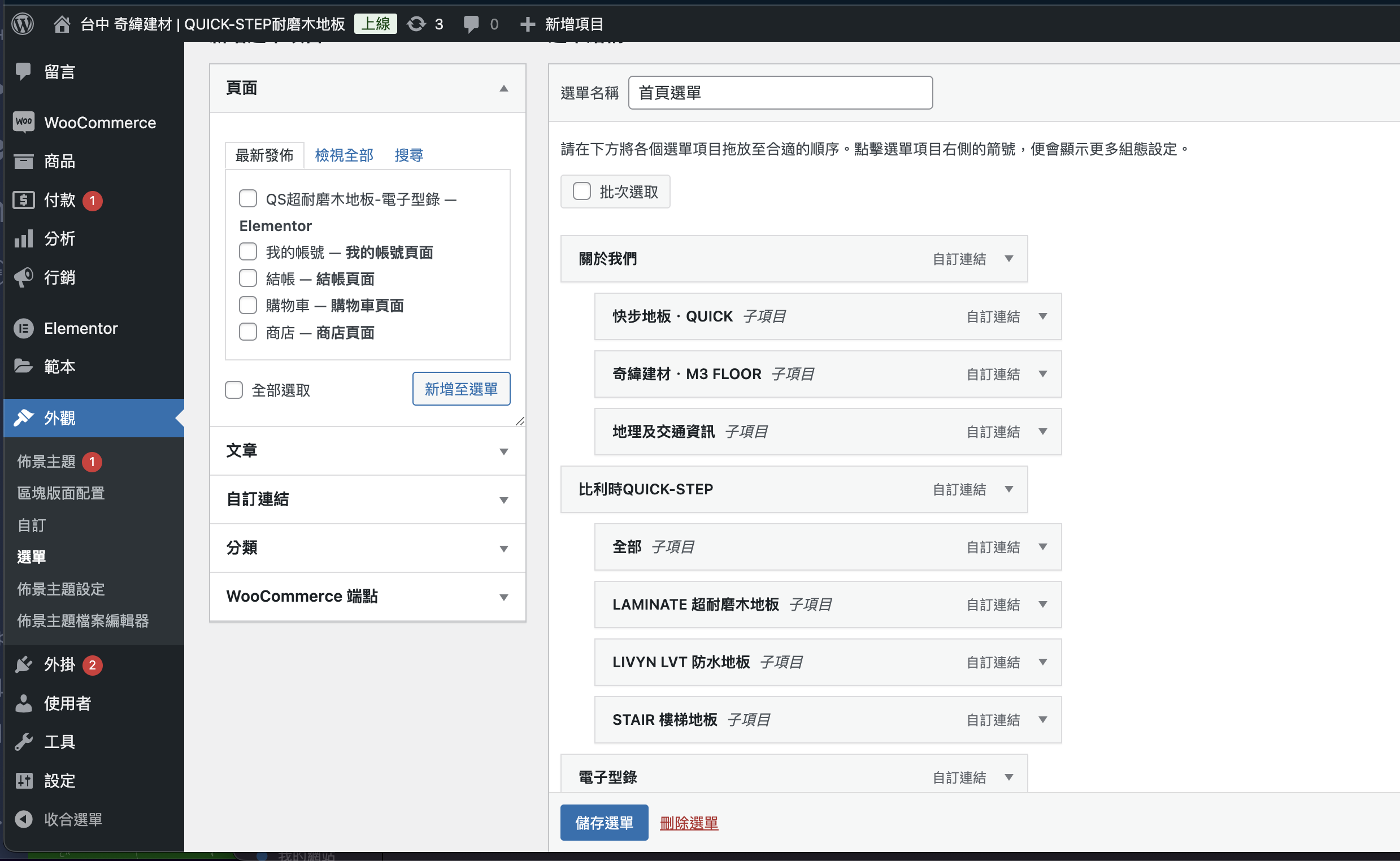
wordpress-background

範例:

假設你在 WordPress 後台創建了一個選單,並命名為「首頁選單」,該選單中包含以下項目:

  1. Home
  2. Services
    • Web Development
    • App Development
  3. About Us
  4. Contact

wp_get_nav_menu_items() 會返回這些選單項目作為一個物件陣列,每個項目包含:

  • ID:選單項目的唯一標識符
  • title:選單項目的標題(如 “Home”, “Services”)
  • url:選單項目的連結
  • menu_item_parent:父選單項目的 ID(若是頂層項目則為 0)

步驟 2:組織選單層次結構

接下來,你需要將這些選單項目按父子關係組織起來,以便生成一個層次結構清晰的選單。這段程式碼的目的是將選單項目分類為父選單和子選單。

1
2
3
4
5
6
7
8
9
10
11
12
$tree_menu_items = array();

foreach ($menu_items as $menu_item) {
if ($menu_item->menu_item_parent == 0) {
// 父選單項目
$tree_menu_items[$menu_item->ID] = $menu_item;
$tree_menu_items[$menu_item->ID]->children = array(); // 初始化子選單陣列
} else {
// 子選單項目,添加到父選單項目的 children 陣列中
$tree_menu_items[$menu_item->menu_item_parent]->children[] = $menu_item;
}
}

範例:

  • 假設 “Services” 是一個父選單項目,它的 menu_item_parent0
  • “Web Development” 和 “App Development” 是它的子選單項目,它們的 menu_item_parent 為 “Services” 的 ID。

程式會將這些項目組織為:

  • Home:無子選單
  • Services
    • 子選單:Web Development, App Development
  • About Us:無子選單
  • Contact:無子選單

步驟 3:生成 HTML 選單

這裡的程式碼將已整理好的選單結構動態地生成 HTML。

1
2
3
4
5
6
7
8
9
10
11
12
13
14
15
16
17
18
19
20
21
22
23
24
<?php if (isset($tree_menu_items)): ?>
<?php foreach ($tree_menu_items as $menu_item): ?>
<li class="menu-item <?php if($hasSubmenu): ?>has-children<?php endif; ?>">
<a id="menu-item-<?php echo $menu_item->ID; ?>" href="<?php echo $menu_item->url; ?>">
<?php echo esc_html($menu_item->title); ?>
<?php if ($hasSubmenu): ?>
<span class="angle-down-wrap"><i class="fa fa-angle-down" aria-hidden="true"></i></span>
<?php endif; ?>
</a>

<?php if ($hasSubmenu): ?>
<ul class="menu-dropdown-list list-unstyled">
<?php foreach ($menu_item->children as $child_menu_item): ?>
<li class="dropdown-list-item">
<a id="menu-item-<?php echo $child_menu_item->ID; ?>" href="<?php echo $child_menu_item->url; ?>">
<?php echo esc_html($child_menu_item->title); ?>
</a>
</li>
<?php endforeach; ?>
</ul>
<?php endif; ?>
</li>
<?php endforeach; ?>
<?php endif; ?>

這段程式碼會生成以下的 HTML:

1
2
3
4
5
6
7
8
9
10
11
12
13
14
15
16
17
18
19
20
21
22
23
24
25
26
27
<ul class="menu-box list-unstyled">
<li class="menu-item">
<a id="menu-item-1" href="/home">Home</a>
</li>
<li class="menu-item has-children">
<a id="menu-item-2" href="/services"
>Services
<span class="angle-down-wrap"
><i class="fa fa-angle-down" aria-hidden="true"></i
></span>
</a>
<ul class="menu-dropdown-list list-unstyled">
<li class="dropdown-list-item">
<a id="menu-item-3" href="/services/web-development">Web Development</a>
</li>
<li class="dropdown-list-item">
<a id="menu-item-4" href="/services/app-development">App Development</a>
</li>
</ul>
</li>
<li class="menu-item">
<a id="menu-item-5" href="/about-us">About Us</a>
</li>
<li class="menu-item">
<a id="menu-item-6" href="/contact">Contact</a>
</li>
</ul>
  • menu-item-2Services,因為它有子選單,所以會附加 has-children class,並顯示一個下拉圖標(<span class="angle-down-wrap">)。
  • 其子選單(Web DevelopmentApp Development)被放在一個內嵌的 <ul class="menu-dropdown-list"> 中。

步驟 4:顯示和樣式

這段程式碼最終將選單顯示在 <header> 中,並包含基於層次結構的樣式(如子選單的下拉圖標和層次結構的縮排)。

補充 wp_get_nav_menu_items() 得到的結構

在 WordPress 中,wp_get_nav_menu_items() 函數返回一個包含選單項目($menu_items)的陣列。每個選單項目都是一個物件,包含許多屬性,這些屬性描述了選單中的每個項目。以下是 $menu_items 中每個選單項目的內容:

每個選單項目會包含以下常見屬性:

  1. ID ($menu_item->ID)
    • 每個選單項目的唯一識別符。這個值可以用來區分不同的選單項目。
  2. title ($menu_item->title)
    • 選單項目的名稱,這是會顯示在前端的文字。
  3. url ($menu_item->url)
    • 選單項目的鏈接地址(例如,指向頁面的 URL)。
  4. menu_item_parent ($menu_item->menu_item_parent)
    • 父選單項目的 ID。如果該選單項目是頂層選單,menu_item_parent 會是 0;如果它是子選單,menu_item_parent 會是其父選單項目的 ID。
  5. post_type ($menu_item->post_type)
    • 指定該選單項目的類型,一般為 nav_menu_item
  6. object ($menu_item->object)
    • 選單項目的目標對象類型,例如 pagecategory。這表示選單鏈接指向的是一個頁面還是分類目錄等。
  7. object_id ($menu_item->object_id)
    • 目標對象的 ID,例如,如果該選單項目連接到一個頁面,這裡會顯示該頁面的 ID。
  8. type ($menu_item->type)
    • 選單項目的類型。通常為 post_typetaxonomy,指的是該選單項目連結到的對象是否是一個文章類型或分類法。
  9. classes ($menu_item->classes)
    • 選單項目所包含的 CSS class。這是一個陣列,通常可用於為選單項目添加自定義樣式。
  10. target ($menu_item->target)
    • 指定鏈接是否在新窗口或當前窗口打開,這與 HTML 的 target="_blank" 類似。
  11. attr_title ($menu_item->attr_title)
    • 為選單項目提供的 title 屬性,用來顯示在鼠標懸停在鏈接上時的提示文字。
  12. description ($menu_item->description)
    • 選單項目的描述,通常不會顯示在前端,但在一些主題中可能會用於輔助說明。
  13. xfn ($menu_item->xfn)
    • 用於指定鏈接關係(XFN,”XHTML Friends Network”),例如指定鏈接到該頁面的使用者關係(朋友、合作夥伴等)。
  14. db_id ($menu_item->db_id)
    • 選單項目的資料庫 ID,與 ID 相同,用來唯一識別該選單項目。
  15. menu_order ($menu_item->menu_order)
    • 選單項目的順序,用來指定該項目在選單中的顯示順序。

範例:$menu_items 的內容範例

假設有一個選單名為「首頁選單」,其中包含以下項目:

  1. Home(頂層選單)
  2. Services(頂層選單)
    • Web Development(子選單)
    • App Development(子選單)
  3. About Us(頂層選單)

那麼,$menu_items 中的內容可能類似以下結構:

1
2
3
4
5
6
7
8
9
10
11
12
13
14
15
16
17
18
19
20
21
22
23
24
25
26
27
28
29
30
31
32
33
34
35
36
37
38
39
40
41
42
43
44
45
46
47
48
49
50
51
52
53
54
55
56
57
58
59
60
61
62
63
64
65
66
67
68
69
70
71
72
73
74
75
76
77
78
79
80
81
82
83
84
85
86
87
88
Array (
[0] => stdClass Object (
[ID] => 1
[title] => Home
[url] => http://example.com/home
[menu_item_parent] => 0
[post_type] => nav_menu_item
[object] => page
[object_id] => 5
[type] => post_type
[classes] => Array ( )
[target] =>
[attr_title] =>
[description] =>
[xfn] =>
[db_id] => 1
[menu_order] => 1
)
[1] => stdClass Object (
[ID] => 2
[title] => Services
[url] => http://example.com/services
[menu_item_parent] => 0
[post_type] => nav_menu_item
[object] => page
[object_id] => 6
[type] => post_type
[classes] => Array ( )
[target] =>
[attr_title] =>
[description] =>
[xfn] =>
[db_id] => 2
[menu_order] => 2
)
[2] => stdClass Object (
[ID] => 3
[title] => Web Development
[url] => http://example.com/web-development
[menu_item_parent] => 2
[post_type] => nav_menu_item
[object] => page
[object_id] => 7
[type] => post_type
[classes] => Array ( )
[target] =>
[attr_title] =>
[description] =>
[xfn] =>
[db_id] => 3
[menu_order] => 3
)
[3] => stdClass Object (
[ID] => 4
[title] => App Development
[url] => http://example.com/app-development
[menu_item_parent] => 2
[post_type] => nav_menu_item
[object] => page
[object_id] => 8
[type] => post_type
[classes] => Array ( )
[target] =>
[attr_title] =>
[description] =>
[xfn] =>
[db_id] => 4
[menu_order] => 4
)
[4] => stdClass Object (
[ID] => 5
[title] => About Us
[url] => http://example.com/about-us
[menu_item_parent] => 0
[post_type] => nav_menu_item
[object] => page
[object_id] => 9
[type] => post_type
[classes] => Array ( )
[target] =>
[attr_title] =>
[description] =>
[xfn] =>
[db_id] => 5
[menu_order] => 5
)
)

說明:

  1. Home:是一個頂層選單項目,menu_item_parent0
  2. Services:也是一個頂層選單項目,menu_item_parent0,並且有子項目。
  3. Web Development:是 Services 的子選單,menu_item_parentServicesID(即 2)。
  4. App Development:也是 Services 的子選單,menu_item_parentServicesID(即 2)。
  5. About Us:是一個頂層選單項目,menu_item_parent0